

In brief: Our AI setup is a small team of specialist agents, not one model doing everything. An Orchestrator agent coordinates the work, an Analyze agent works out what a screen needs, a Component Select agent picks real patterns and components from the design system, a Build agent writes the code, and a Check agent verifies it against hard rules until it passes. Splitting the work this way keeps every step verifiable, makes the system easy to extend, and gives each agent only the guidance that applies to its job.
This is the fourth article in our series on AI-accelerated design inside a large life sciences program. Part two cut a design cycle from four weeks to just over one, and part three described the machine-readable design system at the center of our work. Part four introduces the team of AI agents we built on top of it to handle the mechanical work of turning a request into a verified, on-system screen.

Our AI setup is a small team rather than a single model doing everything at once. Each specialist agent has one job and hands its output to the next, like stations on an assembly line. We designed it this way on purpose. A specialist that does one thing is easier to trust, easier to check, and easier to improve than a generalist that does everything in one opaque step.
Let me walk through the full flow using one real example: a logistics dashboard with a sortable table of shipments and a search bar to filter by shipment ID.
How five AI agents turn a request into a verified screen
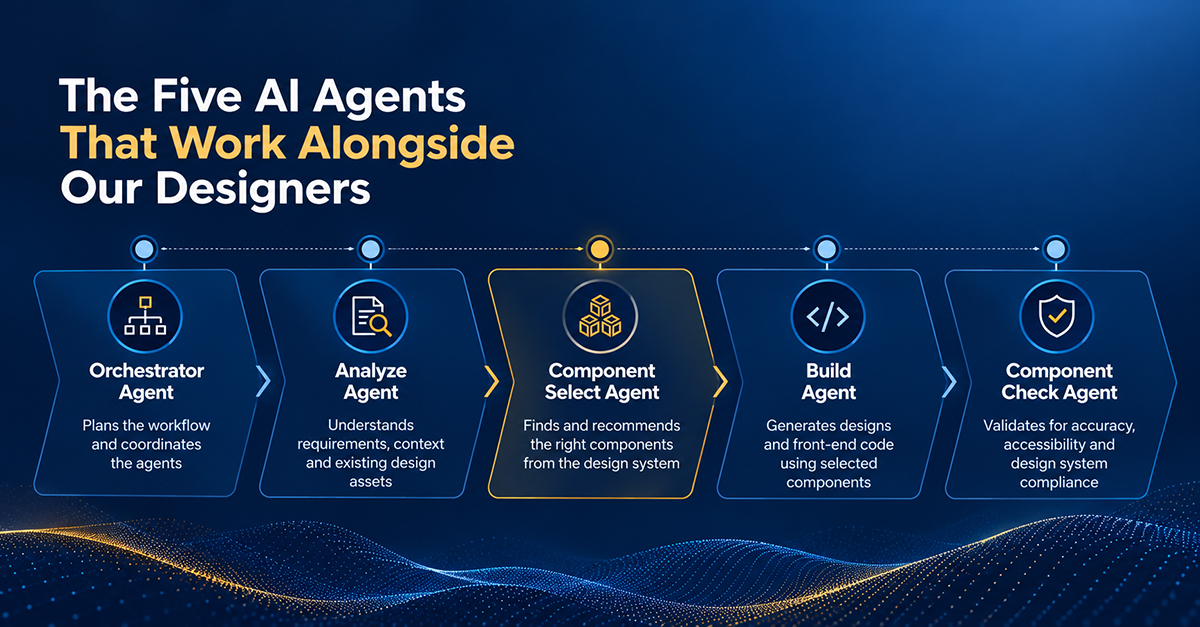
1. Orchestrator agent: coordinates the team
The Orchestrator acts as the project manager. It doesn’t design anything or write any code. Its job is ai agent orchestration: coordinating the other specialist agents and controlling the order in which they run.
In our example, it reads the request, notes that the screen needs a search and filter area and a data table area, and hands off to the Analyze agent.
2. Analyze agent: works out what the screen needs
The Analyze agent turns a plain-English request into a structured checklist. At this stage, it isn’t concerned with buttons or colors. It focuses on the underlying needs of the UI: which areas the screen has, what data and objects are involved, what actions the user can take, what states the screen can be in, and which accessibility needs apply.
For our dashboard, it produced this checklist:
- Areas: a search area and a table area
- Data and objects: shipments, statuses, and IDs
- Actions: filter and sort
- States: the four every data table needs (loading, error, empty, and populated)
- Accessibility: properly labeled column headers, and status shown with a text label, never by color alone
3. Component Select agent: chooses real building blocks
The Component Select agent matches each need to a real component that already exists in the design system library, never to something invented. Before assembling components one by one, it checks whether a whole-screen pattern already covers the need, such as a documented data-table layout instead of a table, search box, and states wired together from scratch. Starting with a proven pattern means the screen inherits decisions that have already been made and validated. Only when no pattern fits does the agent assemble individual components. If nothing in the library covers a need at either level, it flags the gap instead of making something up.
No single pattern covered our full dashboard, so the agent assembled individual components, each pulled straight from the design system library:
- Search box
- Table with sorting enabled
- Status badge
- Loading spinner
This is where the machine-readable design system earns its keep. The agent can choose correctly at both the pattern and the component level because the meaning of every entry is clearly defined.
4. Build agent: writes the code
The Build agent is the only agent that touches real code. Every agent before it makes decisions, and this one carries them out. It takes the exact list of chosen components and writes one complete, working file. That file uses only approved building blocks and their approved settings, the design system’s official colors and spacing, and every state and accessibility requirement the Analyze agent flagged.
In our example, it writes a single dashboard file: a search box at the top, and below it a sortable table showing each shipment ID with a status badge, along with a loading spinner, an empty-state message, and an error message.
5. Component Check agent: verifies the result
The Check agent does much more than a quick look to see whether the screen seems right. It automatically runs a specific checklist, with questions such as these:
Are approved color and spacing values used everywhere, instead of hardcoded ones?
Is each component used only in its approved way?
Are the accessibility requirements actually built in, such as status that doesn’t rely on color alone?
If anything fails, the finding goes back to the Build agent for a fix, and the Check agent runs again. This governed delivery loop repeats automatically until everything passes. In our example, the Check agent might catch a non-standard padding value and a status badge missing its text label, send both back, and re-verify once they’re fixed.
Why we built an assembly line of agents instead of one big AI
The work is verifiable. Because each agent has one specific job, we can check its work against clearly defined rules. The Check agent doesn’t hope the output is fine. It verifies the output against the same standards every time, for every screen. By the time a screen reaches a human, nobody has to wonder whether it is probably okay, because it has already been checked and verified.
The system is easy to extend. A team of specialists makes it simple to add another one. When we later found that answers and validations weren’t traveling between our parallel workstreams, we didn’t need to rebuild the system. We needed to see where another specialist belonged. That agent, and the problem behind it, is the subject of the final article in this series.
Guidance stays scoped. We don’t rely on one giant instruction file that tries to cover everything. Guidance lives where it applies, as scoped rules: repository-level rules, application rules, agent rules, design system rules, and prompt rules. Each agent gets the context relevant to its job and nothing else. Just as each agent has one role, each set of rules has one scope, which keeps the guidance easy to follow, easy to update, and far less likely to contradict itself.
The five agents at a glance
The Orchestrator runs the show. The Analyze agent works out what the screen needs. The Component Select agent chooses real, existing components from our design system. The Build agent writes the code. The Check agent verifies it against hard rules for colors, components, and accessibility, and sends it back for fixes until it’s clean.
That is what designing with AI looks like in an AI-first design flow: a disciplined team of specialists rather than one all-purpose model. The agents work from a design system they can understand and interpret, and they take on the repetitive, mechanical work so our designers can focus on the human work.
Next in the series, and the finale: the human bottlenecks all this speed exposed, and what we did about them. The full series is collected here.
Frequently asked questions
It is a setup where a small team of specialist AI agents, each with one job, hands work from one to the next in an iterative assembly line. In our workflow, five agents turn a plain-English request into a verified screen built from the design system.
Multi-agent orchestration is the coordination layer that decides which agent runs when. Our Orchestrator acts as the project manager. It does not design or write code. It takes the request, forms a rough view of the screen’s major areas, controls the order in which the other agents run, and passes each agent’s output to the next.
Our Component Select agent first checks whether a documented whole-screen pattern covers the need. Starting from a proven pattern means the screen inherits decisions that have already been validated. If none fits, it assembles individual components from the library. It never invents a component, and if nothing covers a need, it flags the gap.
Our Check agent runs an automatic checklist on every screen. It confirms approved color and spacing values, correct component usage, and built-in accessibility such as status that does not rely on color alone. Any failure goes back to the Build agent, and the loop repeats until everything passes.
A specialist that does one thing is easier to trust, check, and improve than a generalist working in one opaque step. Specialist agents make the work verifiable against clear rules, make the system easy to extend, and keep each agent’s guidance scoped to its own job rather than one giant instruction file.